FCM doesn’t support VoIP pushes; use APNs + PushKit for VoIP calls.

iOS UI Kit Sample App

Reference implementation of iOS UIKit, FCM and Push Notification Setup.

What this guide covers

  • CometChat dashboard setup (enable push, add FCM iOS + APNs providers) with screenshots.
  • Firebase/FCM + CometChat provider wiring (credentials, Podfile, capabilities).
  • Token registration/rotation with CometChat Push Notifications (FCM iOS provider).
  • Incoming message/call handling and deep links.
  • Badge count and grouped notifications.
  • Payload customization and testing.

How FCM + CometChat work together

  • FCM’s role: Firebase issues the iOS FCM registration token and delivers the push payload. On iOS, FCM hands off to APNs using the APNs key/cert you upload in Firebase.
  • CometChat Notifications’ role: The FCM iOS provider you create in the CometChat dashboard holds your Firebase service account. When you call CometChatNotifications.registerPushToken(..., .FCM_IOS, providerId), CometChat binds that FCM token to the logged-in user and sends pushes to FCM on your behalf.
  • Flow (same bridge used in android-push-notifications.mdx): Request permission → register for remote notifications → FCM returns the registration token → after CometChat.login succeeds, register that token with CometChatNotifications using the FCM provider ID → CometChat sends payloads to FCM → FCM hands to APNs → UNUserNotificationCenterDelegate surfaces the notification/tap.

1. Enable push and add providers (CometChat Dashboard)

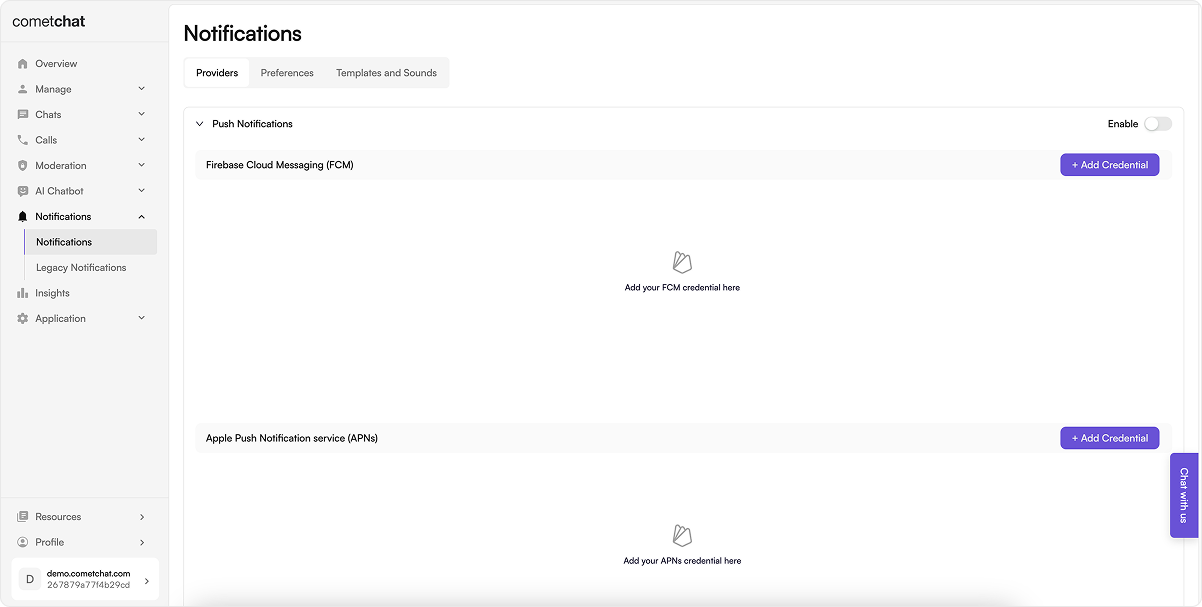
  1. Go to Notifications → Settings and enable Push Notifications.
Enable Push Notifications
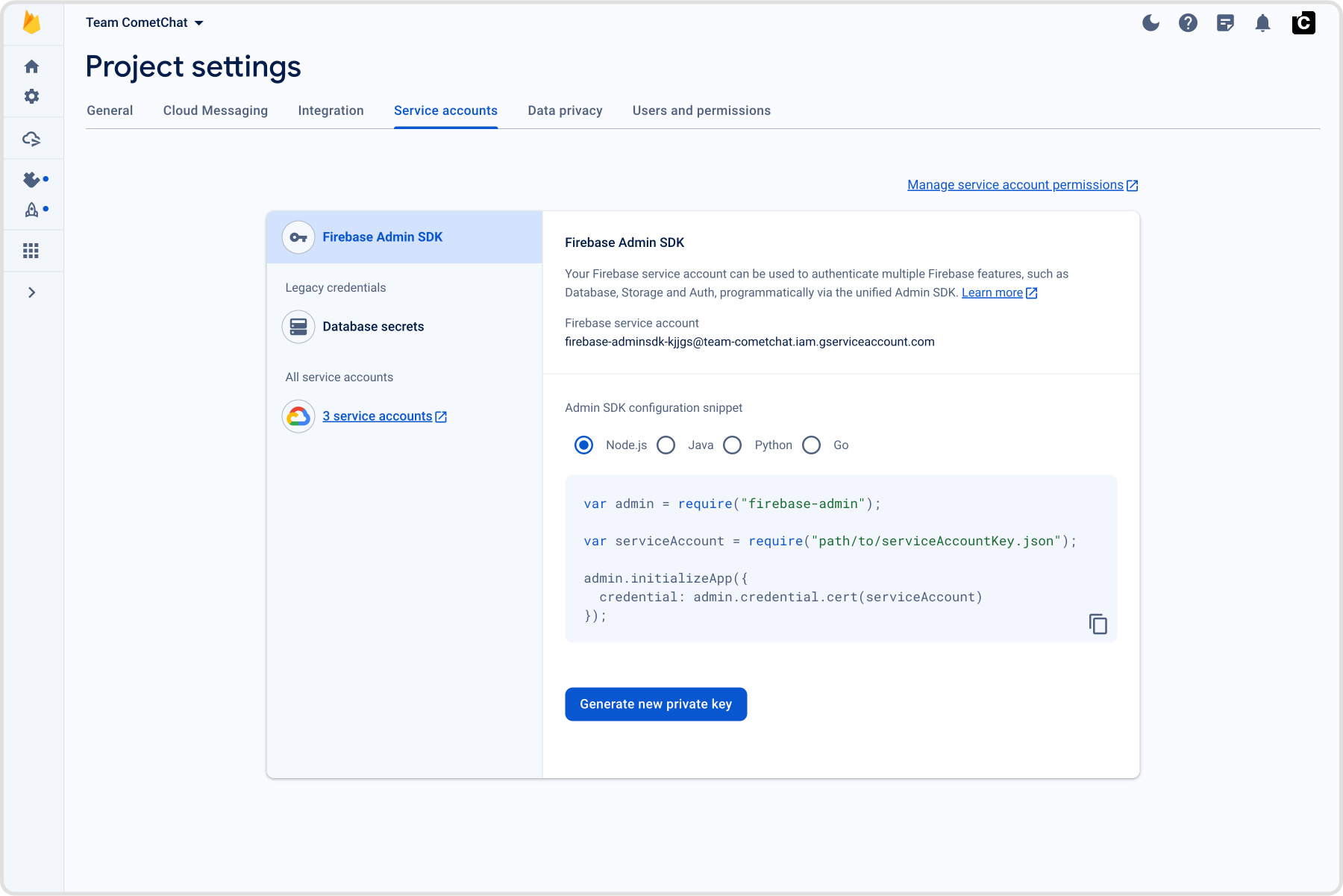
  1. On Firebase:
    • Go to Project Settings → Service accounts and generate a new private key; download the JSON file.
Add FCM credentials
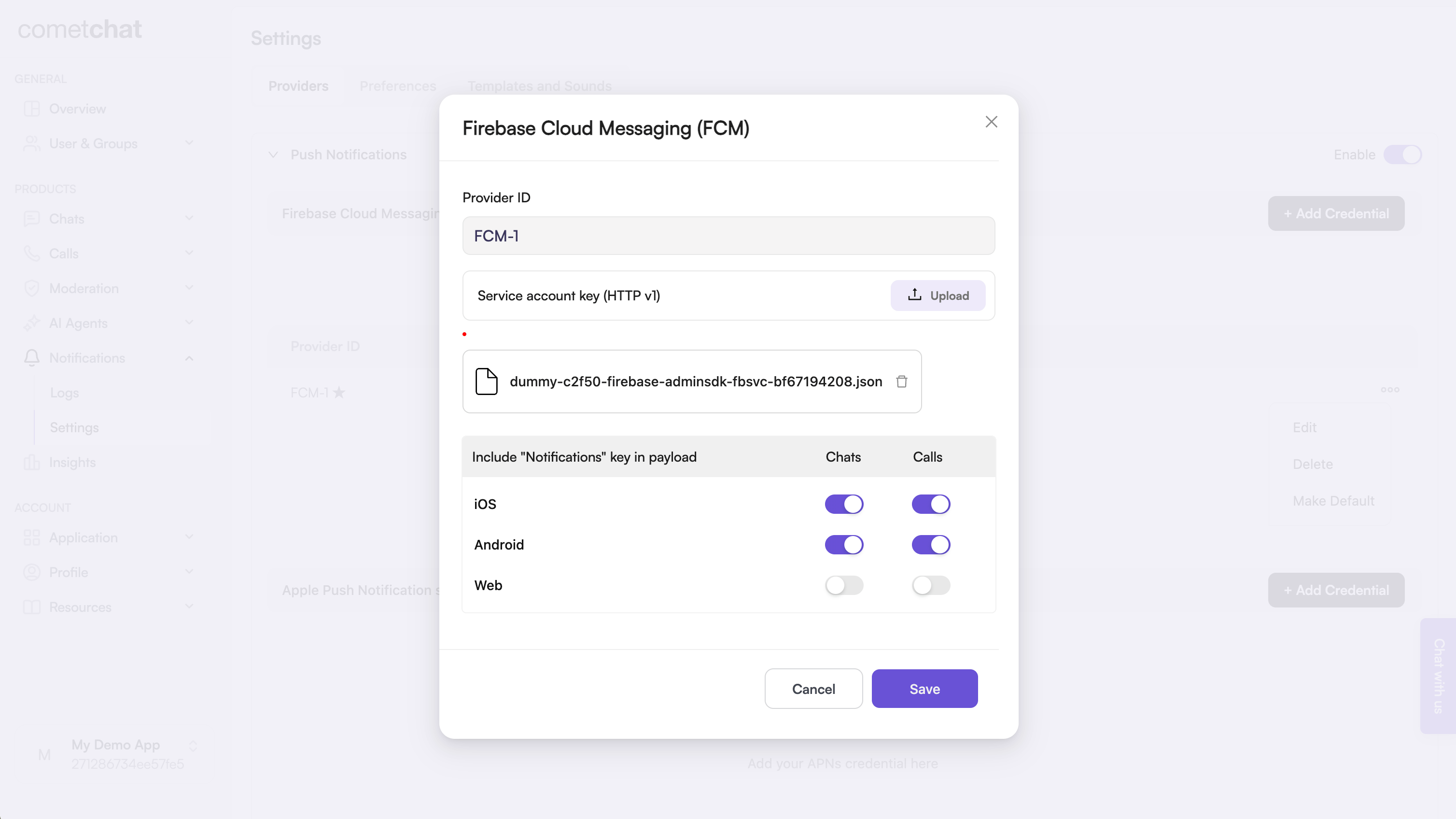
  1. On CometChat Dashboard:
    • Add an FCM iOS provider and upload your Firebase service account JSON; copy the Provider ID.
Add FCM credentials

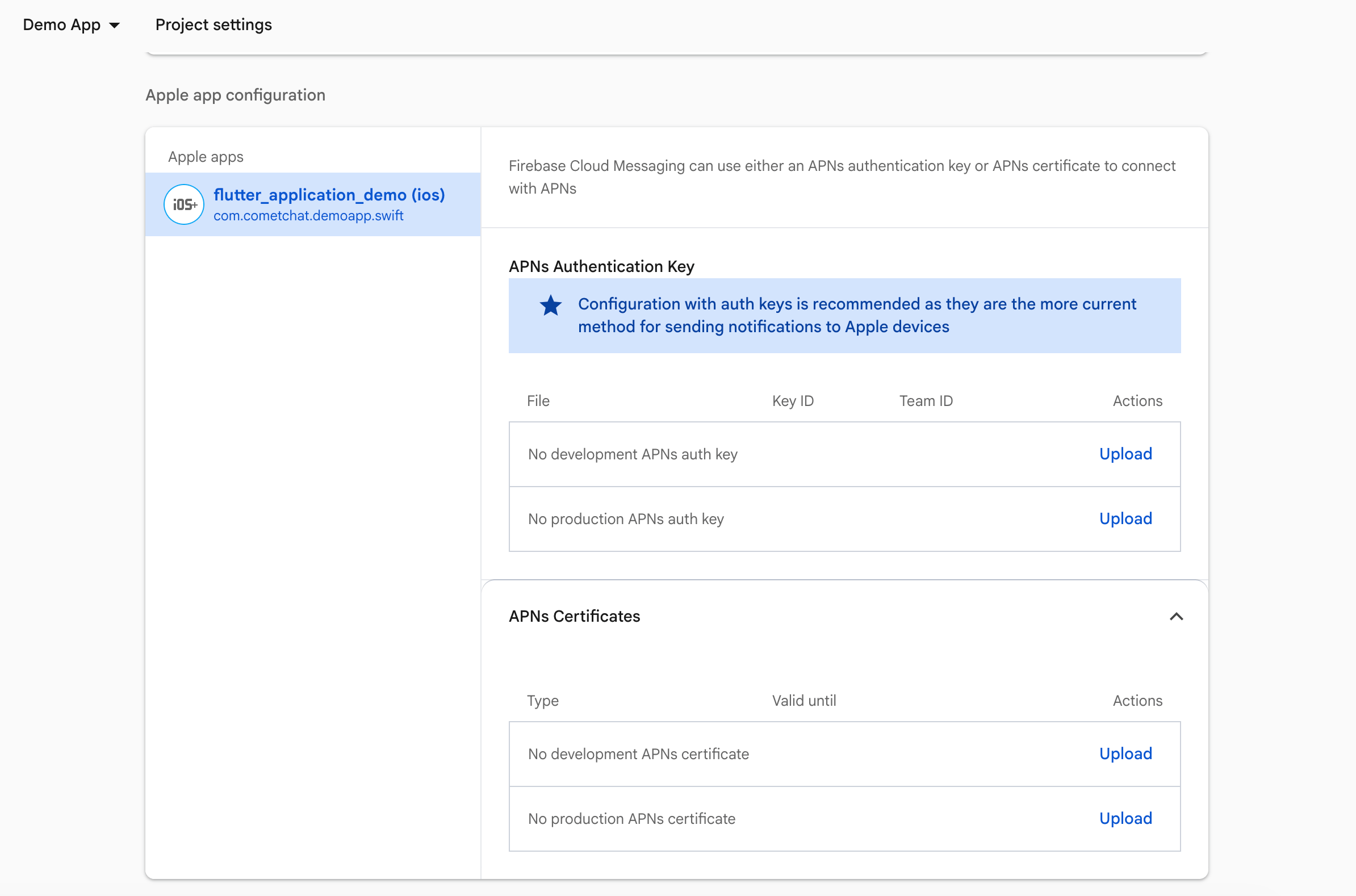
2. Upload your APNs Certificates

  1. In the Firebase Console, go to Project Settings → Cloud Messaging.
  2. Under iOS app configuration, upload your APNs authentication key or certificates.
Upload APNs Certificates in Firebase Console

3. Prepare Firebase and CometChat

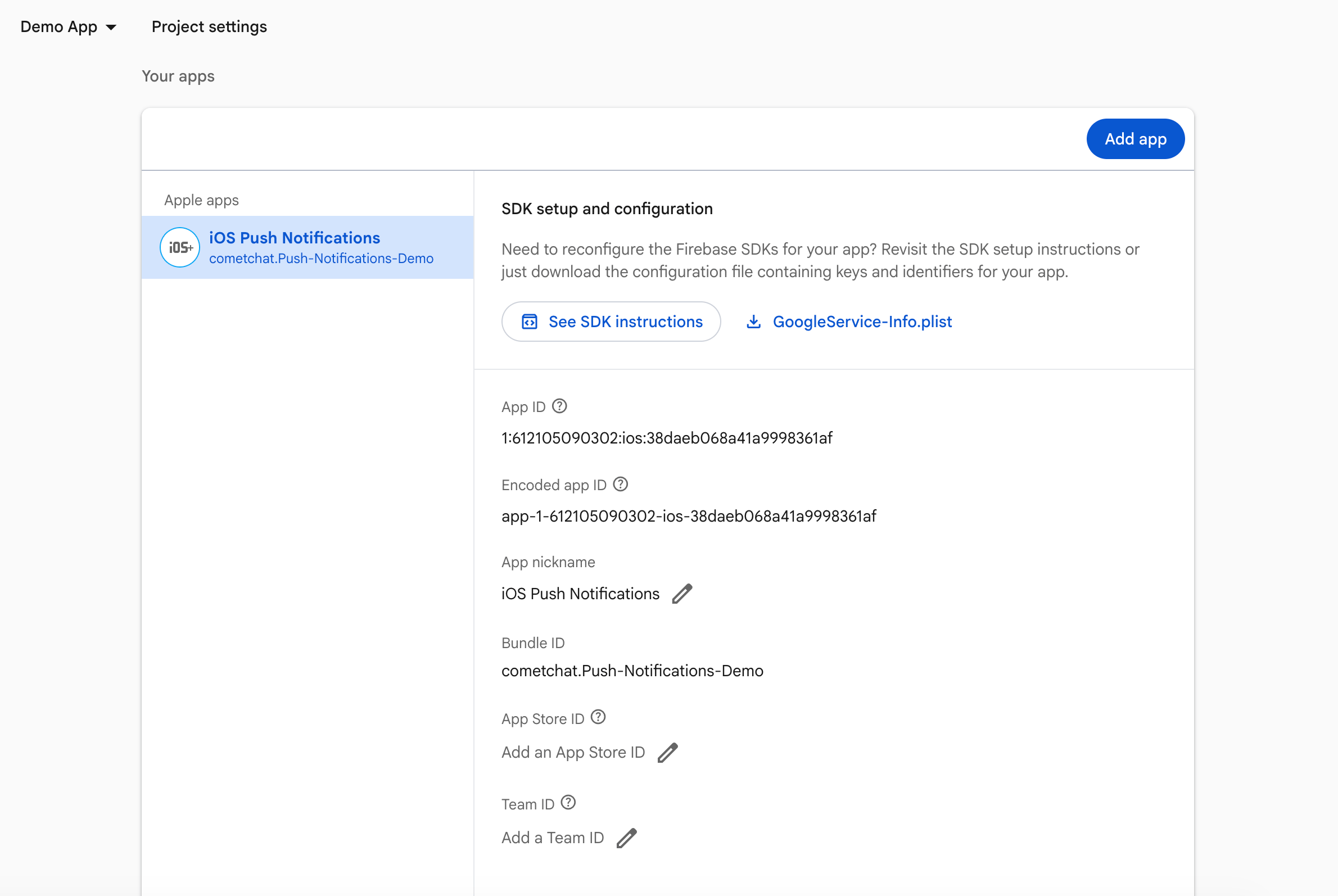
  1. Firebase Console: download and add GoogleService-Info.plist to your target.
Upload APNs Certificates in Firebase Console
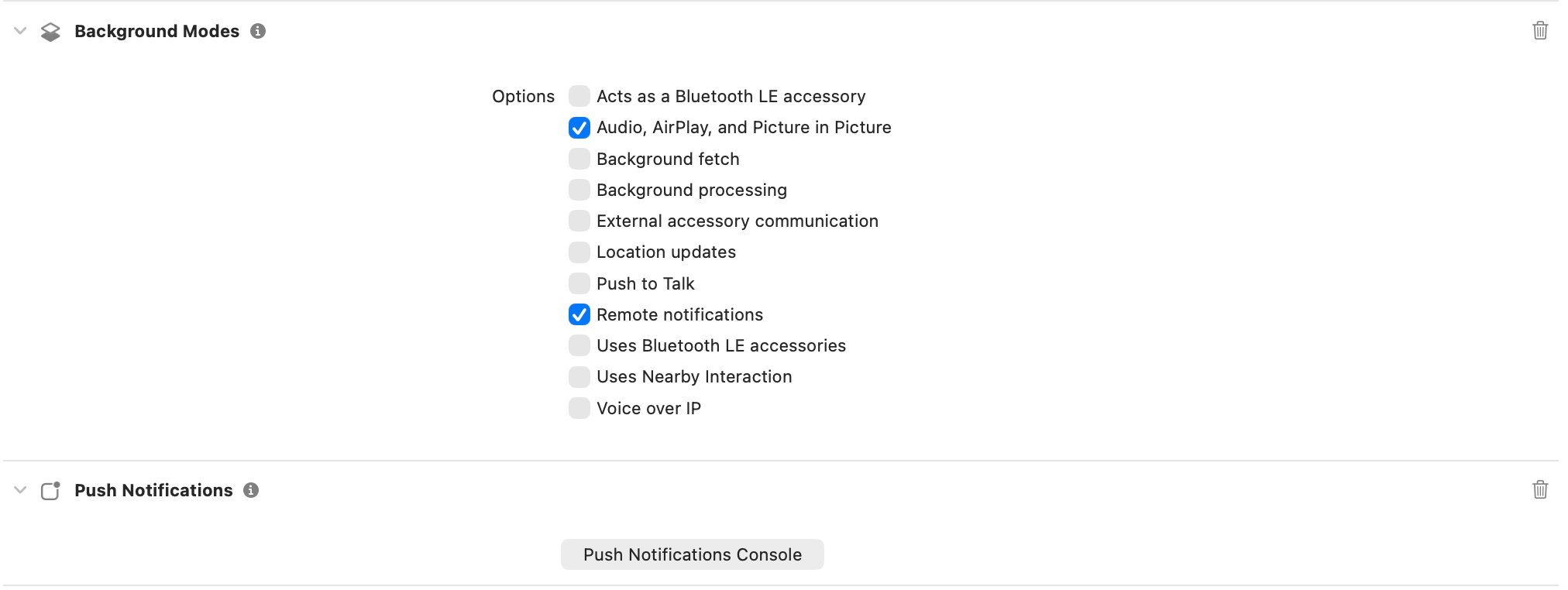
  1. Xcode capabilities: Push Notifications, Background Modes → Remote notifications.
Enable Push Notifications and Background Modes for FCM

4. Add dependencies (Podfile)

target 'YourApp' do
  use_frameworks!

  pod 'CometChatCallsSDK'
  pod 'CometChatUIKitSwift', '5.1.7'
  pod 'Firebase/Messaging'   # add for FCM
end
Run pod install.

5. Wire AppDelegate (Firebase + delegates)

import UIKit
import FirebaseCore
import FirebaseMessaging
import CometChatUIKitSwift
import CometChatSDK

@main
class AppDelegate: UIResponder, UIApplicationDelegate, UNUserNotificationCenterDelegate, MessagingDelegate {

    func application(
        _ application: UIApplication,
        didFinishLaunchingWithOptions launchOptions: [UIApplication.LaunchOptionsKey: Any]?
    ) -> Bool {

        FirebaseApp.configure()

        Messaging.messaging().delegate = self

        UNUserNotificationCenter.current().delegate = self
        UNUserNotificationCenter.current().requestAuthorization(
            options: [.alert, .badge, .sound]
        ) { granted, error in
            print("Notification permission granted:", granted)
            if let error = error {
                print("Permission error:", error.localizedDescription)
            }
            
            // Only register for remote notifications if permission granted
            if granted {
                DispatchQueue.main.async {
                    print("Registering for remote notifications...")
                    application.registerForRemoteNotifications()
                }
            } else {
                print("Push notification permission denied by user")
            }
        }

        return true
    }

    func application(
        _ application: UIApplication,
        didRegisterForRemoteNotificationsWithDeviceToken deviceToken: Data
    ) {
        Messaging.messaging().apnsToken = deviceToken
        
        // Store the token for later registration after login
        let hexString = deviceToken.map { String(format: "%02.2hhx", $0) }.joined()
        UserDefaults.standard.set(hexString, forKey: "apnsPushToken")
        print("APNs token received and stored: \(hexString)")
    }
    
    func application(
        _ application: UIApplication,
        didFailToRegisterForRemoteNotificationsWithError error: Error
    ) {
        print("Failed to register for remote notifications: \(error.localizedDescription)")
    }
    
    func application(
        _ application: UIApplication,
        didReceiveRemoteNotification userInfo: [AnyHashable : Any],
        fetchCompletionHandler completionHandler: @escaping (UIBackgroundFetchResult) -> Void
    ) {
        print("Background notification received:", userInfo)
        completionHandler(.newData)
    }

    func messaging(
        _ messaging: Messaging,
        didReceiveRegistrationToken fcmToken: String?
    ) {
        guard let fcmToken = fcmToken else {
            print("FCM token is nil")
            return
        }

        print("FCM Token received:", fcmToken)
        
        // Store FCM token as well
        UserDefaults.standard.set(fcmToken, forKey: "fcmPushToken")
        
        if let apnsToken = UserDefaults.standard.string(forKey: "apnsPushToken") {
            print("Registering APNs token with CometChat: \(apnsToken)")
            CometChatNotifications.registerPushToken(
                pushToken: fcmToken,
                platform: CometChatNotifications.PushPlatforms.FCM_IOS,
                providerId: AppConstants.PROVIDER_ID,
                onSuccess: { success in
                    print("APNs token registered with CometChat: \(success)")
                },
                onError: { error in
                    print("APNs token registration failed: \(error.errorCode) - \(error.errorDescription)")
                }
            )
        } else {
            print("No stored APNs token found - Check if Push Notifications capability is enabled in Xcode")
        }
    }


    func userNotificationCenter(
        _ center: UNUserNotificationCenter,
        willPresent notification: UNNotification,
        withCompletionHandler completionHandler: @escaping (UNNotificationPresentationOptions) -> Void
    ) {
        completionHandler([.banner, .sound, .badge])
    }
    
    // Call this method AFTER CometChat login succeeds
    static func registerStoredPushToken() {
        guard CometChat.getLoggedInUser() != nil else {
            print("Cannot register push token: User not logged in")
            return
        }
        
        // Register APNs token
        if let apnsToken = UserDefaults.standard.string(forKey: "apnsPushToken") {
            print("Registering APNs token with CometChat: \(apnsToken)")
            CometChatNotifications.registerPushToken(
                pushToken: apnsToken,
                platform: CometChatNotifications.PushPlatforms.APNS_IOS_DEVICE,
                providerId: AppConstants.PROVIDER_ID,
                onSuccess: { success in
                    print("APNs token registered with CometChat: \(success)")
                },
                onError: { error in
                    print("APNs token registration failed: \(error.errorCode) - \(error.errorDescription)")
                }
            )
        } else {
            print("No stored APNs token found - Check if Push Notifications capability is enabled in Xcode")
        }
        
        // Register FCM token
        if let fcmToken = UserDefaults.standard.string(forKey: "fcmPushToken") {
            print("Registering FCM token with CometChat...")
            CometChat.registerTokenForPushNotification(
                token: fcmToken,
                onSuccess: { message in
                    print("CometChat FCM token registered successfully")
                },
                onError: { error in
                    print("CometChat FCM token registration failed:", error?.errorDescription ?? "Unknown error")
                }
            )
        } else {
            print("No stored FCM token found")
        }
    }
}
What this code is doing
  • Initializes Firebase, sets MessagingDelegate and UNUserNotificationCenterDelegate, asks for alert/badge/sound permission, and registers for remote notifications.
  • Sets Messaging.messaging().apnsToken so FCM can map the APNs token and later deliver via APNs.
  • Stores the FCM registration token and calls registerStoredPushToken() so CometChat can bind the token to your logged-in user (using the Provider ID you configured).
  • Leaves willPresent to show banners/sounds in foreground instead of silently ignoring the notification.

6. Create FCM helper

Create CometChatFCMHelper.swift and add:
import UIKit
import UserNotifications

final class CometChatFCMHelper {

    static let shared = CometChatFCMHelper()
    private init() {}

    /// Configure push notifications (iOS-safe)
    func configure(application: UIApplication, delegate: UNUserNotificationCenterDelegate) {

        // 1. Request permission
        UNUserNotificationCenter.current().requestAuthorization(
            options: [.alert, .badge, .sound]
        ) { granted, error in
            print("Notification permission:", granted)
            if let error = error {
                print("Permission error:", error.localizedDescription)
            }
        }

        // 2. Set delegate
        UNUserNotificationCenter.current().delegate = delegate

        // 3. Register for APNs
        DispatchQueue.main.async {
            application.registerForRemoteNotifications()
        }
    }
}
What this helper is doing
  • Wraps permission prompts + delegate wiring so you can call one method from AppDelegate.
  • Sets the notification delegate early and registers for APNs on the main queue (Apple requirement).
  • Keeps all push setup in a reusable singleton to call from tests, scenes, or multi-target setups.

7. Badge count and grouped notifications

CometChat’s Enhanced Push Notification payload includes an unreadMessageCount field (a string) representing the total unread messages across all conversations for the logged-in user. Use this to set the app icon badge and enrich local notifications.

7.1 Enable unread badge count on the CometChat Dashboard

1

Navigate to Push Notification Preferences

Go to CometChat Dashboard → Notifications → Settings → Preferences → Push Notification Preferences.
2

Enable Unread Badge Count

Scroll to the bottom and enable the Unread Badge Count toggle.
This ensures CometChat includes the unreadMessageCount field in every push payload sent to your app.

7.2 Clear badge count when app becomes active

Add the following to your SceneDelegate.swift to reset the badge when the user opens the app:
func sceneDidBecomeActive(_ scene: UIScene) {
    // Clear badge count when user opens the app
    UIApplication.shared.applicationIconBadgeNumber = 0
    print("Badge count cleared")
}

7.3 Update badge count from push notifications

Update your AppDelegate.swift to handle badge count updates in both foreground and background states:
func userNotificationCenter(
    _ center: UNUserNotificationCenter,
    willPresent notification: UNNotification,
    withCompletionHandler completionHandler: @escaping (UNNotificationPresentationOptions) -> Void
) {
    let userInfo = notification.request.content.userInfo
    print("Will present notification: \(userInfo)")
    
    // Update badge count from payload
    if let unreadCountString = userInfo["unreadMessageCount"] as? String,
       let unreadCount = Int(unreadCountString) {
        if unreadCount >= 0 {
            UIApplication.shared.applicationIconBadgeNumber = unreadCount
            print("Badge count updated (foreground): \(unreadCount)")
        }
    } else {
        print("No unreadMessageCount in payload")
    }
    
    completionHandler([.banner, .badge, .sound])
}
The unreadMessageCount field is sent as a string in the payload. Always parse it to an integer and validate it’s non-negative before updating the badge.

8. Testing checklist

  1. FirebaseApp.configure() runs; FCM token logs after login; registration with CometChat succeeds.
  2. Message from another user:
    • Foreground: willPresent behavior as expected.
    • Background/terminated: tap opens the correct chat.
  3. Rotate the FCM token (didReceiveRegistrationToken) and confirm re-registration.
  4. VoIP: VoIP token registers; incoming call shows CallKit; Accept/Decline controls the CometChat call.

9. Troubleshooting

SymptomQuick checks
No FCM pushesGoogleService-Info.plist present; APNs key uploaded to Firebase; bundle ID matches; permission granted.
Token registration failsRun after login; provider ID matches FCM iOS provider; Messaging.messaging().delegate set.
Taps ignoredEnsure UNUserNotificationCenterDelegate methods fire and navigation is ready before routing.
Call UI missingAdd PushKit + CallKit wiring; register VoIP token with an APNs VoIP provider; ensure VoIP/background modes are enabled.